
FluidFPS
Universal Game Frame Generation & GPU Upscaling Engine
The Challenge
Game scaling tools like Lossless Scaling are powerful but closed-source. I wanted to understand how GPU-level frame interception, motion-interpolated frame generation, and spatial upscaling actually work at the engine level — then build a production-quality alternative with a modern UI, not just a proof-of-concept.
The Approach
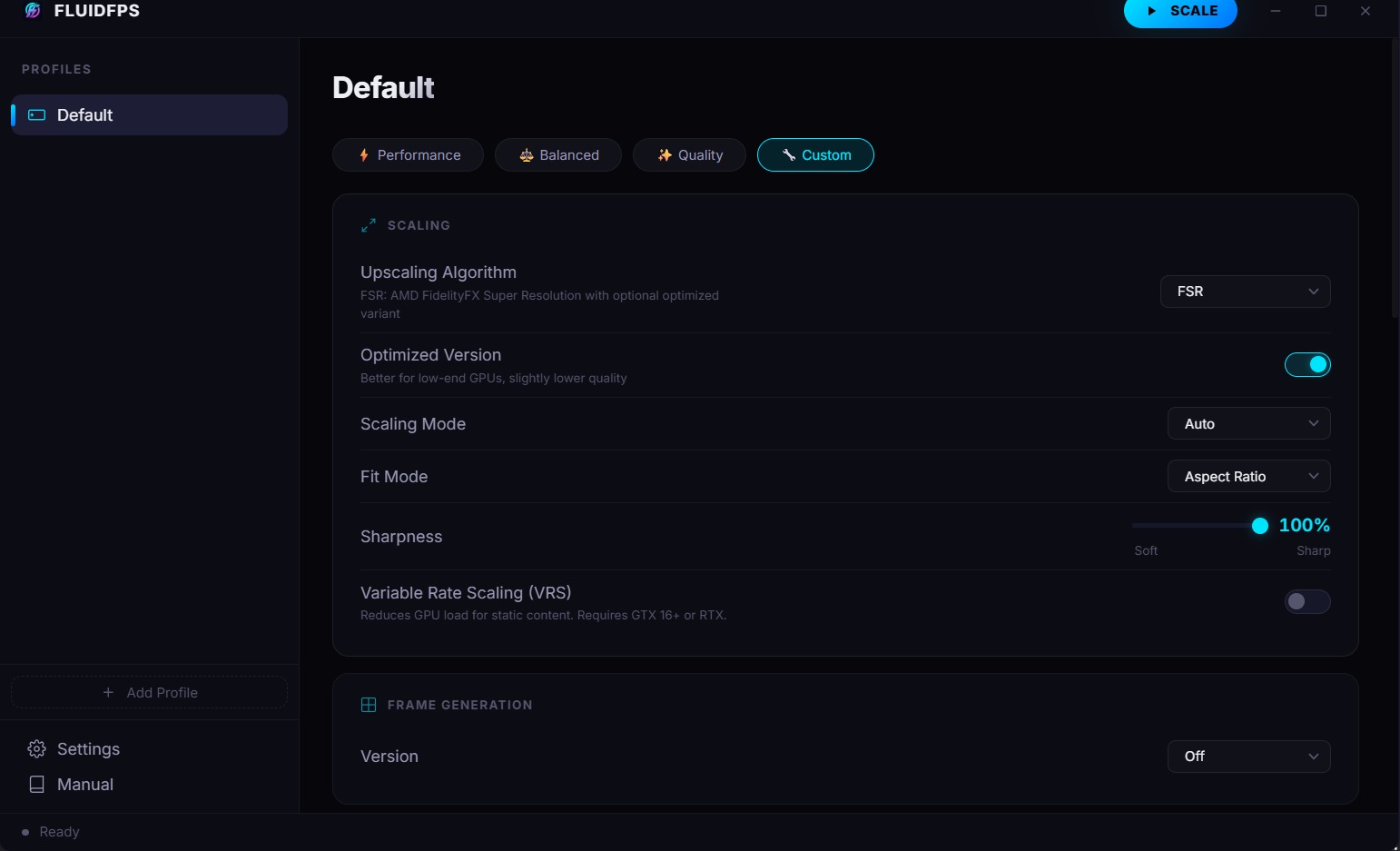
Started by reverse-engineering the .NET assemblies of commercial frame scaling tools to understand their DirectX hooking patterns and interpolation algorithms. Then rebuilt the core engine as a native C++ DLL for maximum GPU performance, wrapped it in a .NET 10 WPF host with P/Invoke bindings, and replaced the traditional WPF page-based UI with a React/Vite frontend served through WebView2 — using COM-visible bridge objects for seamless JavaScript-to-native communication. The result is a modern, responsive UI that controls a low-level GPU engine.
System Architecture
A 3-layer hybrid architecture designed to keep GPU-critical code in native C++ while providing a modern web-based UI. Layer 1 is the Native GPU Engine (Fluid.dll, 5.4MB C++) which handles DirectX frame capture through 3 APIs (DXGI Desktop Duplication, Windows Graphics Capture, GDI), spatial upscaling via 10+ algorithms (FSR, NIS, SGSR, BicubicCAS, Anime4K, XBR, SharpBilinear, Integer Scaling, Nearest Neighbor), and 5 frame generation modes (LSFG 1-3 with fixed/adaptive multipliers, LSFI, LSFI1) with HDR passthrough, G-Sync/FreeSync, VRS, and multi-GPU output selection. Layer 2 is the .NET 10 WPF Host (C#) which manages window lifecycle, system tray, global keyboard hotkeys, single-instance enforcement via WndProc, per-game profile persistence through XML serialization, foreground window detection, admin privilege escalation, and multi-language support. It communicates with Fluid.dll through P/Invoke with marshaled delegates for status callbacks. Layer 3 is the React/Vite Frontend (TypeScript) — a full React SPA hosted inside WebView2 with components for profile navigation, custom window chrome with drag-to-move, a 36KB scaling/generation configuration page, settings, manual, and modals. It communicates with the C# host through a COM-visible FluidFPSBridge class exposed via AddHostObjectToScript, enabling the frontend to call native methods like Scale(), GetProfiles(), GetAdapters(), and GetDisplays() directly.
System architecture overview
Built For
PC gamers who want to run games at higher frame rates and resolutions without hardware upgrades — from budget gamers doubling 30 FPS to 60, to enthusiasts pushing 60 FPS to 120+ on high-refresh displays. Also appeals to retro game enthusiasts using Integer Scaling and anime game players using Anime4K upscaling. Works with any DirectX game running in windowed or borderless windowed mode.
Design Decisions
Why a 3-layer architecture instead of a monolithic .NET app?
GPU frame capture and interpolation need to run at native C++ speed — .NET garbage collection pauses would cause visible frame stuttering. The WPF host handles OS integration (tray, hotkeys, profiles) where .NET excels, while the React frontend via WebView2 gives us a modern, responsive UI that's far richer than WPF XAML. Each layer does what it's best at.
Why WebView2 + React instead of keeping the WPF UI?
WPF pages require verbose XAML for complex UIs. The ProfilePage alone is 36KB of TypeScript — building that in XAML with proper data binding would be a maintenance nightmare. React's component model, state management, and hot reload made the configuration-heavy UI dramatically more productive to build and iterate on.
Why 3 capture APIs instead of just DXGI?
DXGI Desktop Duplication is fastest but doesn't work with all games (especially UWP/Store apps). Windows Graphics Capture handles modern apps but has higher latency. GDI is the universal fallback. Supporting all three means FluidFPS works with virtually any windowed application.
Why reverse engineer first, then rebuild?
Academic papers describe algorithms in theory, but production implementations have GPU-specific optimizations, edge case handling, and performance tricks that papers don't cover. Reverse engineering the actual compiled binaries revealed the "production secret sauce" — then I rebuilt it all from scratch with my own architecture.
Tech Stack
Outcomes & Impact
- Production-ready desktop tool with 10+ spatial upscalers (FSR, NIS, SGSR, Anime4K, XBR, Integer Scaling, and more)
- 5 frame generation modes including adaptive multiplier targeting specific FPS goals
- Hybrid 3-layer architecture: native C++ engine + .NET 10 WPF host + React/Vite frontend via WebView2
- COM-visible bridge enabling React UI to directly invoke native GPU operations
- Per-game profile system with wildcard exe/window matching and auto-scaling on game launch
- Multi-GPU, multi-display, HDR, G-Sync/FreeSync, and VRS support
- Self-contained single-file deployment compiled to a single 69MB executable
💬 Behind the Scenes
“This project started as pure reverse-engineering curiosity — decompiling compiled binaries and tracing DirectX API calls to understand how frame interpolation actually works at the GPU level. But it quickly evolved into a full production tool once I realized the architecture patterns were elegant enough to rebuild properly. The most satisfying moment was getting the WebView2 ↔ C# ↔ C++ pipeline working seamlessly: clicking a button in React, having it call a COM bridge method in C#, which P/Invokes into a native DLL, which then hooks into DirectX — and watching your game suddenly run at double the frame rate.”